
Transformers documentation
모델 디버깅 도구
모델 디버깅 도구
이 페이지에서는 라이브러리가 사용하는 모든 디버깅 및 모델 추가 도구와 이를 위해 제공하는 유틸리티 함수를 나열합니다.
대부분은 라이브러리에 새 모델을 추가할 때만 유용합니다.
모델 추가 디버거
모델 추가 디버거 - 모델 추가자를 위한 컨텍스트 매니저
이 컨텍스트 매니저는 모델 추가자를 위한 고급 사용자 도구입니다. 모델의 forward 호출 내의 모든 forward 호출을 추적하고 각 입력 및 출력의 슬라이스를 중첩된 JSON에 기록합니다. 참고로 이 컨텍스트 매니저는 torch.no_grad()를 강제 적용합니다.
근거
Transformers로 모델을 이식할 때, Python에서 Python으로의 이식이라도 모델 추가자는 텐서의 저장 및 로드, dtype 비교 등 수동 작업을 많이 수행해야 합니다. 이 작은 도구가 시간을 절약하는 데 도움이 되기를 바랍니다.
사용
모델 디버깅을 위해 이 컨텍스트 매니저를 다음과 같이 추가하세요:
import torch
from PIL import Image
import requests
from transformers import LlavaProcessor, LlavaForConditionalGeneration
from transformers.model_debugging_utils import model_addition_debugger_context
torch.random.manual_seed(673)

# load pretrained model and processor
model_id = "llava-hf/llava-1.5-7b-hf"
processor = LlavaProcessor.from_pretrained(model_id)
model = LlavaForConditionalGeneration.from_pretrained(model_id)

# create random image input
random_image = Image.fromarray(torch.randint(0, 256, (224, 224, 3), dtype=torch.uint8).numpy())

# prompt
prompt = "<image>Describe this image."

# process inputs
inputs = processor(text=prompt, images=random_image, return_tensors="pt")

# call forward method (not .generate!)
with model_addition_debugger_context(
    model,
    debug_path="optional_path_to_your_directory",
    do_prune_layers=False # This will output ALL the layers of a model.
):
    output = model.forward(**inputs)
결과 읽기
디버거는 forward 호출에서 두 개의 파일을 생성합니다. 두 파일은 동일한 기본 이름을 가지며, 각각 _SUMMARY.json 또는 _FULL_TENSORS.json으로 끝납니다.
첫 번째에는 각 모듈의 입력 및 출력 텐서 값과 형태가 요약되어 있습니다.
{
  "module_path": "MolmoForConditionalGeneration",
  "inputs": {
    "args": [],
    "kwargs": {
      "input_ids": {
        "shape": "torch.Size([1, 589])",
        "dtype": "torch.int64"
      },
      "attention_mask": {
        "shape": "torch.Size([1, 589])",
        "dtype": "torch.int64"
      },
      "pixel_values": {
        "shape": "torch.Size([1, 5, 576, 588])",
        "dtype": "torch.float32",
        "mean": "tensor(-8.9514e-01, device='cuda:0')",
        "std": "tensor(9.2586e-01, device='cuda:0')",
        "min": "tensor(-1.7923e+00, device='cuda:0')",
        "max": "tensor(1.8899e+00, device='cuda:0')"
    }
  },
  "children": [
    {
      "module_path": "MolmoForConditionalGeneration.language_model.model.embed_tokens",
      "inputs": {
        "args": [
          {
            "shape": "torch.Size([1, 589])",
            "dtype": "torch.int64"
          }
        ]
      },
      "outputs": {
        "shape": "torch.Size([1, 589, 3584])",
        "dtype": "torch.float32",
        "mean": "tensor(6.5460e-06, device='cuda:0')",
        "std": "tensor(2.3807e-02, device='cuda:0')",
        "min": "tensor(-3.3398e-01, device='cuda:0')",
        "max": "tensor(3.9453e-01, device='cuda:0')"
      }
    },
    {
      "module_path": "MolmoForConditionalGeneration.vision_tower",
      "inputs": {
        "args": [
          {
            "shape": "torch.Size([5, 1, 576, 588])",
            "dtype": "torch.float32",
            "mean": "tensor(-8.9514e-01, device='cuda:0')",
            "std": "tensor(9.2586e-01, device='cuda:0')",
            "min": "tensor(-1.7923e+00, device='cuda:0')",
            "max": "tensor(1.8899e+00, device='cuda:0')"
          }
        ],
        "kwargs": {
          "output_hidden_states": "True"
        }
      },
      "children": [
        { ... and so on
_FULL_TENSORS.json 파일은 모든 텐서의 전체 뷰를 표시하며, 두 파일을 비교하는 데 유용합니다.
      "pixel_values": {
        "shape": "torch.Size([1, 5, 576, 588])",
        "dtype": "torch.float32",
        "value": [
          "tensor([[[[-1.7923e+00, -1.7521e+00, -1.4802e+00,  ..., -1.7923e+00, -1.7521e+00, -1.4802e+00],",
          "          [-1.7923e+00, -1.7521e+00, -1.4802e+00,  ..., -1.7923e+00, -1.7521e+00, -1.4802e+00],",
          "          [-1.7923e+00, -1.7521e+00, -1.4802e+00,  ..., -1.7923e+00, -1.7521e+00, -1.4802e+00],",
          "          ...,",
          "          [-1.7923e+00, -1.7521e+00, -1.4802e+00,  ..., -1.7923e+00, -1.7521e+00, -1.4802e+00],",
          "          [-1.7923e+00, -1.7521e+00, -1.4802e+00,  ..., -1.7923e+00, -1.7521e+00, -1.4802e+00],",
          "          [-1.7923e+00, -1.7521e+00, -1.4802e+00,  ..., -1.7923e+00, -1.7521e+00, -1.4802e+00]],",
          "",
          "         [[-1.7923e+00, -1.7521e+00, -1.4802e+00,  ..., -1.7923e+00, -1.7521e+00, -1.4802e+00],",
          "          [-1.7923e+00, -1.7521e+00, -1.4802e+00,  ..., -1.7923e+00, -1.7521e+00, -1.4802e+00],",
          "          [-1.7923e+00, -1.7521e+00, -1.4802e+00,  ..., -1.7923e+00, -1.7521e+00, -1.4802e+00],",
          "          ...,",
          "          [-1.4857e+00, -1.4820e+00, -1.2100e+00,  ..., -6.0979e-01, -5.9650e-01, -3.8527e-01],",
          "          [-1.6755e+00, -1.7221e+00, -1.4518e+00,  ..., -7.5577e-01, -7.4658e-01, -5.5592e-01],",
          "          [-7.9957e-01, -8.2162e-01, -5.7014e-01,  ..., -1.3689e+00, -1.3169e+00, -1.0678e+00]],",
          "",
          "         [[-1.7923e+00, -1.7521e+00, -1.4802e+00,  ..., -1.7923e+00, -1.7521e+00, -1.4802e+00],",
          "          [-1.7923e+00, -1.7521e+00, -1.4802e+00,  ..., -1.7923e+00, -1.7521e+00, -1.4802e+00],",
          "          [-1.7923e+00, -1.7521e+00, -1.4802e+00,  ..., -1.7923e+00, -1.7521e+00, -1.4802e+00],",
          "          ...,",
          "          [-3.0322e-01, -5.0645e-01, -5.8436e-01,  ..., -6.2439e-01, -7.9160e-01, -8.1188e-01],",
          "          [-4.4921e-01, -6.5653e-01, -7.2656e-01,  ..., -3.4702e-01, -5.2146e-01, -5.1326e-01],",
          "          [-3.4702e-01, -5.3647e-01, -5.4170e-01,  ..., -1.0915e+00, -1.1968e+00, -1.0252e+00]],",
          "",
          "         [[-1.1207e+00, -1.2718e+00, -1.0678e+00,  ..., 1.2013e-01, -1.3126e-01, -1.7197e-01],",
          "          [-6.9738e-01, -9.1166e-01, -8.5454e-01,  ..., -5.5050e-02, -2.8134e-01, -4.2793e-01],",
          "          [-3.4702e-01, -5.5148e-01, -5.8436e-01,  ..., 1.9312e-01, -8.6235e-02, -2.1463e-01],",
          "          ...,",
          "          [-1.7923e+00, -1.7521e+00, -1.4802e+00,  ..., -1.7923e+00, -1.7521e+00, -1.4802e+00],",
          "          [-1.7923e+00, -1.7521e+00, -1.4802e+00,  ..., -1.7923e+00, -1.7521e+00, -1.4802e+00],",
          "          [-1.7923e+00, -1.7521e+00, -1.4802e+00,  ..., -1.7923e+00, -1.7521e+00, -1.4802e+00]],",
          "",
          "         [[-1.0039e+00, -9.5669e-01, -6.5546e-01,  ..., -1.4711e+00, -1.4219e+00, -1.1389e+00],",
          "          [-1.0039e+00, -9.5669e-01, -6.5546e-01,  ..., -1.7193e+00, -1.6771e+00, -1.4091e+00],",
          "          [-1.6317e+00, -1.6020e+00, -1.2669e+00,  ..., -1.2667e+00, -1.2268e+00, -8.9720e-01],",
          "          ...,",
          "          [-1.7923e+00, -1.7521e+00, -1.4802e+00,  ..., -1.7923e+00, -1.7521e+00, -1.4802e+00],",
          "          [-1.7923e+00, -1.7521e+00, -1.4802e+00,  ..., -1.7923e+00, -1.7521e+00, -1.4802e+00],",
          "          [-1.7923e+00, -1.7521e+00, -1.4802e+00,  ..., -1.7923e+00, -1.7521e+00, -1.4802e+00]]]], device='cuda:0')"
        ],
        "mean": "tensor(-8.9514e-01, device='cuda:0')",
        "std": "tensor(9.2586e-01, device='cuda:0')",
        "min": "tensor(-1.7923e+00, device='cuda:0')",
        "max": "tensor(1.8899e+00, device='cuda:0')"
      },
tensor를 디스크에 저장
일부 모델 추가자는 구현 간 수치 분석과 같은 작업을 지원하기 위해 전체 텐서 값을 디스크에 기록하는 것에서 이점을 얻을 수 있습니다.
use_repr=False를 설정하여 SafeTensors를 사용해 텐서를 디스크에 저장합니다.
with model_addition_debugger_context(
    model,
    debug_path="optional_path_to_your_directory",
    do_prune_layers=False,
    use_repr=False,   # Defaults to True
):
output = model.forward(**inputs)use_repr=False를 사용할 경우, 텐서는 _SUMMARY.json 및 _FULL_TENSORS.json 파일과 동일한 디스크 위치에 기록됩니다. _FULL_TENSORS.json 파일의 항목의 value 속성에는 관련 .safetensors 파일에 대한 상대 경로 참조가 포함됩니다. 각 텐서는 상태 사전의 data 속성으로 자체 파일에 기록됩니다. 파일 이름은 module_path를 접두사로 사용하고, 재귀적으로 생성되는 몇 가지 가능한 접미사를 조합하여 구성됩니다.
- 모듈의 입력은
_inputs로, 출력은_outputs로 표시됩니다. list및tuple인스턴스, 예를 들어args나 함수 반환 값은_{index}가 접미사로 붙습니다.dict인스턴스는_{key}로 접미사가 붙습니다.
구현 방식 비교
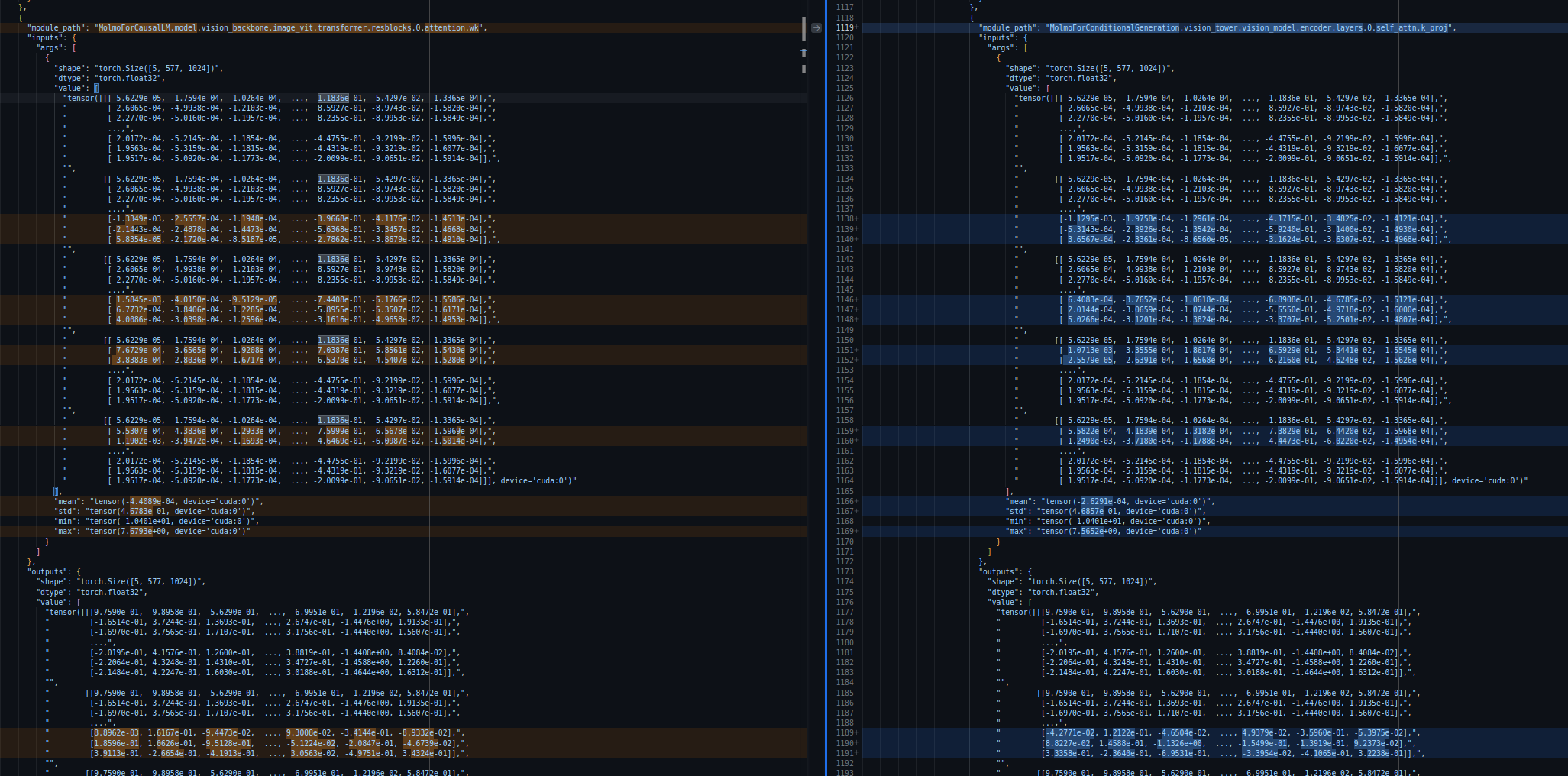
디버거에 의해 두 모델의 forward pass가 추적된 후, json 출력 파일을 비교할 수 있습니다. 아래를 참고하세요: 두 구현체의 key projection layer 사이에 미세한 차이가 있음을 확인할 수 있습니다. 입력은 대부분 동일하지만 완전히 같지는 않습니다. 파일의 차이를 살펴보면 어떤 레이어에 오류가 있는지 더 쉽게 파악할 수 있습니다.
한계 및 범위
이 기능은 torch 기반 모델에서만 작동합니다. 외부 커널 호출에 크게 의존하는 모델은 작동할 수 있지만, trace가 일부 사항을 놓칠 가능성이 높습니다. 어쨌든, 다른 구현을 모방하려는 Python 구현은 N번의 브레이크포인트를 설정하고 다시 실행하는 대신 한 번만 trace할 수 있습니다.
do_prune_layers=False를 모델 디버거에 전달하면 모든 레이어가 json으로 출력됩니다. 그렇지 않으면 첫 번째와 마지막 레이어만 표시됩니다. 이는 일부 레이어(일반적으로 cross-attention)가 N개의 레이어 이후에 나타나는 경우에 유용합니다.
transformers.model_addition_debugger_context
< source >( modeldebug_path: str | None = Nonedo_prune_layers: bool = Trueuse_repr: bool = True )
모델 추가 디버거 - 모델 추가자를 위한 컨텍스트 매니저
이 컨텍스트 매니저는 모델 추가자를 위한 고급 사용자 도구입니다.
모델의 forward 내에서 모든 forward 호출을 추적하고, 각 입력 및 출력의 슬라이스를 중첩된 JSON 파일에 기록합니다.
use_repr=True(기본값)인 경우, JSON 파일은 텐서의 repr() 변환된 버전을 문자열 목록으로 기록합니다. use_repr=False인 경우, 전체 텐서가 별도의 SafeTensors 파일에 저장되고, JSON 파일은 해당 파일에 대한 상대 경로를 제공합니다.
참고로, 이 컨텍스트 매니저는 torch.no_grad()를 강제 적용합니다.
사용
디버깅을 위해 모델에 컨텍스트 매니저를 추가합니다
import torch

from PIL import Image
from transformers import LlavaProcessor, LlavaForConditionalGeneration, model_addition_debugger_context

torch.random.manual_seed(673)

# load pretrained model and processor
model_id = "llava-hf/llava-1.5-7b-hf"
processor = LlavaProcessor.from_pretrained(model_id)
model = LlavaForConditionalGeneration.from_pretrained(model_id)

# create random image input
random_image = Image.fromarray(torch.randint(0, 256, (224, 224, 3), dtype=torch.uint8).numpy())

# prompt
prompt = "<image>Describe this image."

# process inputs
inputs = processor(text=prompt, images=random_image, return_tensors="pt")

# call forward method (not .generate!)
with model_addition_debugger_context(model, debug_path="Your_debug_path", do_prune_layers=False):
    output = model.forward(**inputs)
Analyzer of skipped tests
모델 추가자 및 유지보수자를 위한 건너뛴 테스트 스캔
이 작은 유틸리티는 모델 추가자 및 유지보수자를 위한 고급 사용자 도구입니다. test_modeling_common.py에 존재하며 모든 모델 테스터 클래스가 상속하는 모든 테스트 메서드를 나열하고, 저장소를 스캔하여 어떤 모델에서 몇 개의 테스트가 건너뛰어지는지 측정합니다.
근거
모델을 Transformers로 이식할 때 테스트는 당연히 실패하며, 때로는 test_modeling_common가 우리 새 모델의 특수한 점과 양립하기 어렵게 느껴질 수 있습니다. 그런데 겉보기에는 무해해 보이는 skip을 추가하면서 모든 것을 깨뜨리고 있지 않다는 것을 어떻게 확신할 수 있을까요?
이 유틸리티는:
- scans all test_modeling_common methods
- 메서드가 건너뛴 시점을 찾습니다
- DataFrame로 로드하거나 검사할 수 있는 요약 json을 반환합니다
예를 들어, 이 유틸리티를 작성한 시점에서 test_inputs_embeds는 무려 39%의 비율로 건너뛰어집니다.

사용
스킵된 테스트 분석기는 두 가지 방식으로 실행할 수 있습니다:
전체 스캔(기본값)
transformers 저장소의 루트에서 모든 일반적인 테스트 메서드를 스캔하고 결과를 JSON 파일(기본값: all_tests_scan_result.json)에 출력합니다.
python utils/scan_skipped_tests.py --output_dir path/to/output
--output_dir(선택 사항): JSON 결과가 저장될 디렉터리입니다. 기본값은 현재 디렉터리입니다.
예시 출력:
🔬 Parsing 331 model test files once each...
📝 Aggregating 224 tests...
  (224/224) test_update_candidate_strategy_with_matches_1es_3d_is_nonecodet_schedule_fa_kwargs
✅ Scan complete.

📄 JSON saved to /home/pablo/git/transformers/all_tests_scan_result.json
그리고 검사할 수 있는 all_tests_scan_result.json 파일을 생성합니다. JSON은 메서드 이름으로 인덱싱되며, 각 항목은 이 스키마를 따르며 출처(common 또는 GenerationMixin)도 표시합니다.
{
  "<method_name>": {
    "origin": "<test suite>"
    "models_ran": ["<model_name>", ...],
    "models_skipped": ["<model_name>", ...],
    "skipped_proportion": <float>,
    "reasons_skipped": ["<model_name>: <reason>",
      ...
    ]
  },
  ...
}
위와 같이 pandas 등을 사용하여 시각화할 수 있습니다.
df = pd.read_json('all_tests_scan_result.json').T
df.sort_values(by=['skipped_proportion'], ascending=False)
단일 테스트 메서드 스캔
--test_method_name를 사용하여 특정 테스트 메서드에 집중할 수 있습니다:
python utils/scan_skipped_tests.py --test_method_name test_inputs_embeds --output_dir path/to/output
--test_method_name: 스캔할 테스트 메서드의 이름 (예:test_inputs_embeds).--output_dir(선택 사항): JSON 결과가 저장될 디렉터리.
예시 출력:
$ python utils/scan_skipped_tests.py --test_method_name test_inputs_embeds

🔬 Parsing 331 model test files once each...

== test_inputs_embeds ==

Ran    : 199/323
Skipped : 124/323 (38.4%)
 - aimv2: Aimv2 does not use inputs_embeds
 - align: Inputs_embeds is tested in individual model tests
 - altclip: Inputs_embeds is tested in individual model tests
 - audio_spectrogram_transformer: AST does not use inputs_embeds
 - beit: BEiT does not use inputs_embeds
 - bit: Bit does not use inputs_embeds
 - blip: Blip does not use inputs_embeds
 - blip_2: Inputs_embeds is tested in individual model tests
 - bridgetower:
 - canine: CANINE does not have a get_input_embeddings() method.
 - ...

📄 JSON saved to /home/pablo/git/transformers/scan_test_inputs_embeds.json
모듈형 모델 감지기
코드 유사성 분석기 - 모델 추가자를 위한
이 유틸리티는 모델 구현 간의 코드 유사도를 분석하여 모듈화 기회를 식별합니다. 임베딩 기반 및 토큰 기반 유사도 메트릭을 사용하여 새 또는 기존 모델링 파일을 라이브러리 내 모든 모델과 비교합니다.
근거
transformers에 새 모델을 추가할 때, 많은 구성 요소(attention layer, MLP, 출력 등)가 이미 다른 모델에서 유사한 형태로 존재할 수 있습니다. 처음부터 모든 것을 구현하는 대신, 모델 추가자는 모듈화를 통해 어떤 기존 클래스가 유사하고 재사용 가능한지 식별할 수 있습니다.
이 도구는 두 가지 유사도 점수를 계산합니다:
- 임베딩 점수:
Qwen/Qwen3-Embedding-4B를 통해 생성된 의미론적 코드 임베딩을 사용하여 이름이 달라도 기능적으로 유사한 코드를 감지합니다 - Jaccard score: 토큰 집합의 중복을 측정하여 구조적으로 유사한 코드 패턴을 식별합니다
1.00의 점수는 코드가 동일함을 의미합니다.
사용
transformers 저장소의 루트에서:
python utils/modular_model_detector.py --modeling-file path/to/modeling_file.py
tool은 Hub에서 사전 구축된 인덱스를 자동으로 다운로드합니다(임베딩 모델에 RAM/VRAM이 필요합니다).
예시 출력:
Loading checkpoint shards: 100%|████████████████████| 2/2 [00:00<00:00, 33.62it/s]
encoding 21 query definitions with Qwen/Qwen3-Embedding-4B (device=cuda, batch=16, max_length=4096)

stuff.py::Beit3ImageTextMatchingOutput:
embedding:
    blip_2::Blip2ImageTextMatchingModelOutput (0.9994)
    chinese_clip::ChineseCLIPOutput (0.9818)
    owlvit::OwlViTOutput (0.9818)
jaccard:
    owlv2::Owlv2Output (0.9667)
    metaclip_2::MetaClip2Output (0.9667)
    altclip::AltCLIPOutput (0.9667)
intersection:
    blip::BlipOutput
    owlvit::OwlViTOutput

stuff.py::Beit3MLP:
embedding:
    efficientloftr::EfficientLoFTRMLP (0.9718)
    seggpt::SegGptMlp (0.9650)
jaccard:
    chinese_clip::ChineseCLIPTextSelfOutput (0.5294)
    bert::BertSelfOutput (0.5294)
intersection:
intersection 필드는 상위 5개 결과에 모두 포함된 클래스를 표시하며, 모듈화 후보에 대한 높은 신뢰도를 나타냅니다.
커스텀 인덱스 만들기
로컬 코드베이스에서 인덱스를 다시 빌드하려면(새로운 모델을 추가하거나 다른 임베딩 모델을 사용하는 경우 유용합니다):
python utils/modular_model_detector.py --build
재구성된 인덱스를 Hub 데이터셋으로 푸시하려면:
python utils/modular_model_detector.py --build --push-new-index --hub-dataset your-org/your-dataset
옵션
--modeling-file: 분석할 modeling 파일의 경로--build:src/transformers/models/의 모든 modeling 파일에서 코드 유사성 인덱스를 빌드합니다--push-new-index: 빌드 후 Hub 데이터셋에 인덱스를 푸시합니다(--build필요)--hub-dataset: 인덱스를 pull/push할 Hub dataset 저장소 ID (기본값:hf-internal-testing/transformers_code_embeddings)
한계
이 도구는 임베딩 모델(Qwen/Qwen3-Embedding-4B)을 실행하는 데 GPU/CPU 리소스가 필요합니다. 기본적으로 사전 구축된 인덱스가 Hub에서 다운로드되며, 이는 첫 사용 시 인터넷 연결이 필요합니다.
결과값은 코드 유사성에 기반한 제안이며, 모듈화 전에 수동으로 검토해야 합니다. 높은 유사도 점수가 완벽한 호환성을 보장하지는 않습니다.
Update on GitHub